coreimage with metal 笔记

xcode

近期有自定义CoreImage的CIFilter的需求,前期通过CIKL 定义 CIKernel完成了任务,后面了解到CoreImage新特性支持metal的方式直接自定义 CIKernel,提高效率。

CIKL的方式,存在两个问题:

  • 编写 kernel 的时候,没有报错提示,哪怕是参数名错误都无法检查处理。效率极低。
  • 翻译转换,编译,都是发生到运行时,导致第一次使用滤镜的时候,耗时较久。

Metal: 在build阶段 就可以编译 链接 .metal文件
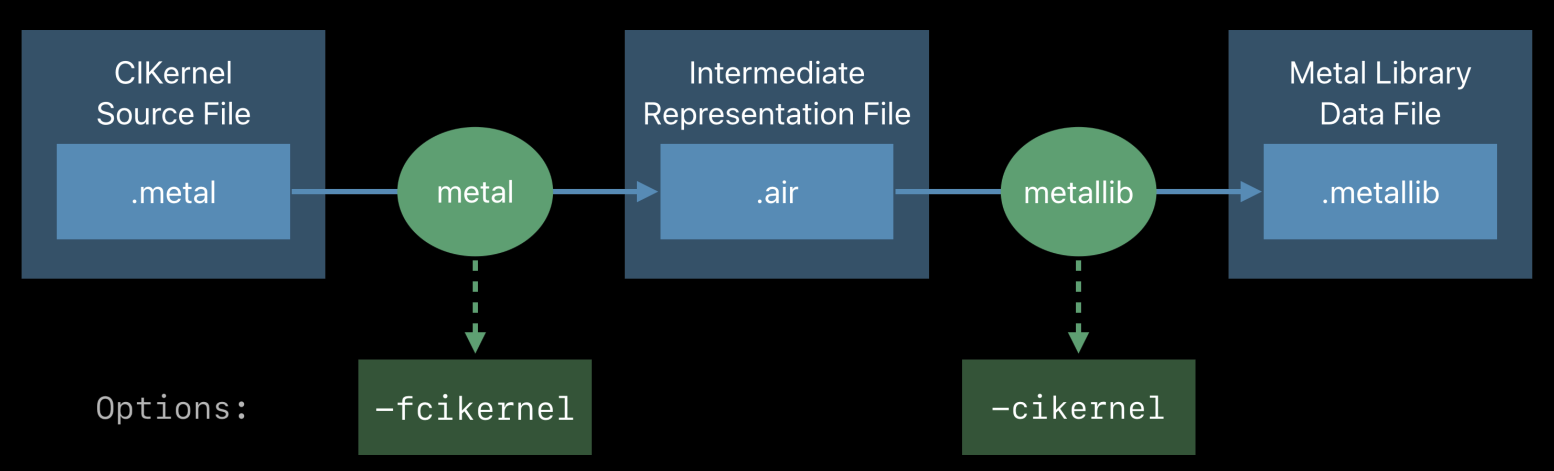
Compiling & Linking

参考苹果的官方文档 Metal Shading Language for CoreImage Kernels ,在xcode integration 部分提到在build setting 设置 Other Metal Compiler Flags, 文档已经很老了(2018年的),新版的xcode已经没有这个选项了,如果不做处理,会有报错 "/air-lld:1:1: symbol(s) not found for target 'air64-apple-ios12.0.0'" and "air-lld command failed with exit code 1 (use -v to see invocation)"

build rules

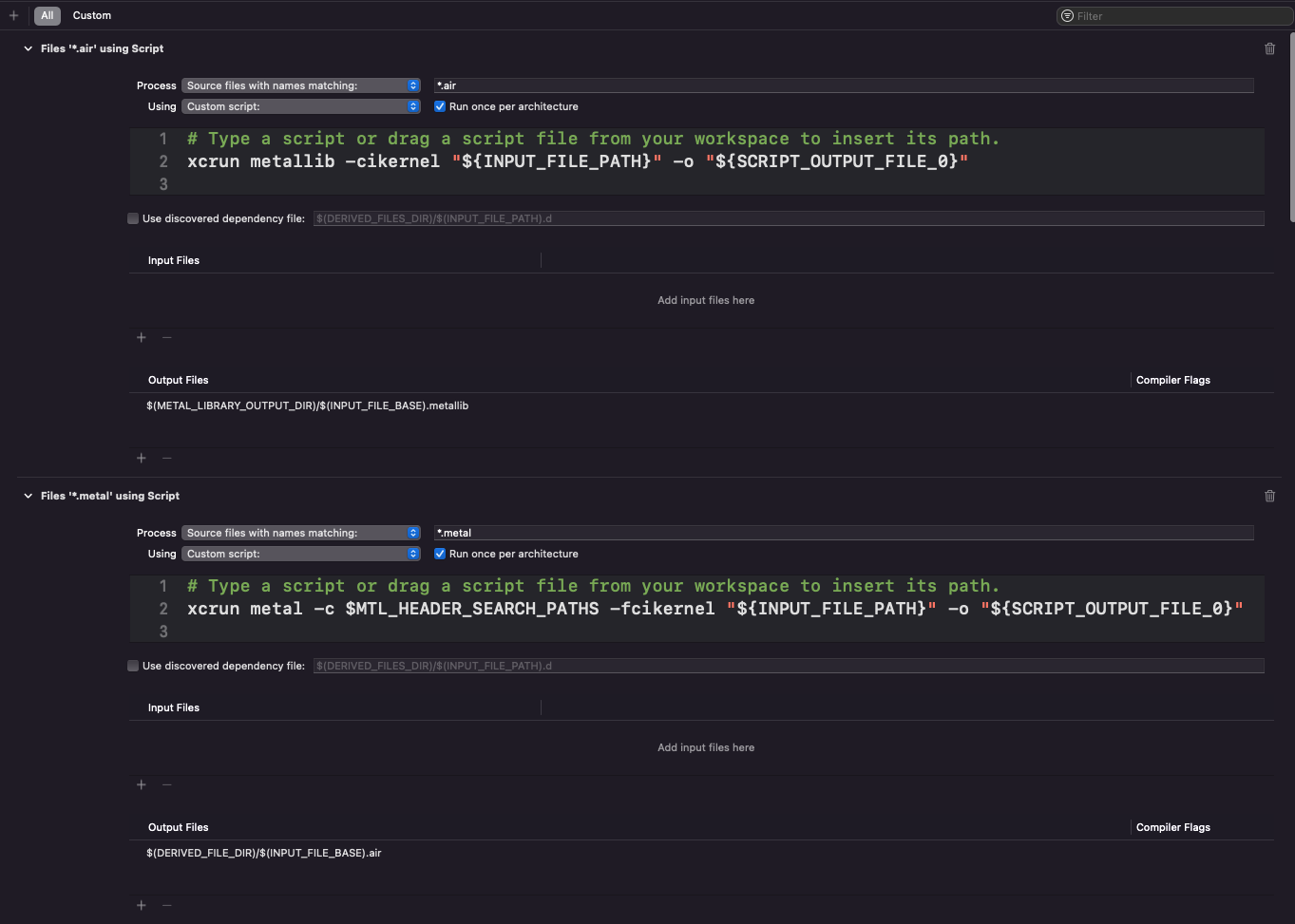
新版xcode中可以通过配置build rules解决上面的报错

*.metal

1
xcrun metal -c $MTL_HEADER_SEARCH_PATHS -fcikernel "${INPUT_FILE_PATH}" -o "${SCRIPT_OUTPUT_FILE_0}"

output files : $(METAL_LIBRARY_OUTPUT_DIR)/$(INPUT_FILE_BASE).metallib

*.air

1
xcrun metallib -cikernel "${INPUT_FILE_PATH}" -o "${SCRIPT_OUTPUT_FILE_0}"

output files : $(DERIVED_FILE_DIR)/$(INPUT_FILE_BASE).air

如图:
IMAGE

cocoapods

build rules 的方式存在一个问题,如果metal shader文件在pod库中,在主工程从配置build rules无法针对pod中的resouce 生效,虽然可以手动针对pod target 配置build rules解决问题,但是这样配置是一次性的,无法提交保存,下一次pod update就清空了,所以到了这里就很自然的能想到通过pod 的post hook 来解决问题,接下来就是怎么用ruby 来写 pod hook 脚本了

通过之前在主工程配置build rules, 可以看到project.pbxproj文件的变更情况

1
2
3
4
5
6
7
8
9
10
11
12
13
14
15
16
17
18
19
20
21
22
23
24
25
26
27
28
29
30
/* Begin PBXBuildRule section */
BF25E98B28A0A91A00188AE3 /* PBXBuildRule */ = {
isa = PBXBuildRule;
compilerSpec = com.apple.compilers.proxy.script;
filePatterns = "*.metal";
fileType = pattern.proxy;
inputFiles = (
);
isEditable = 1;
outputFiles = (
"$(DERIVED_FILE_DIR)/$(INPUT_FILE_BASE).air",
);
runOncePerArchitecture = 0;
script = "# Type a script or drag a script file from your workspace to insert its path.\nxcrun metal -c $MTL_HEADER_SEARCH_PATHS -fcikernel \"${INPUT_FILE_PATH}\" -o \"${SCRIPT_OUTPUT_FILE_0}\"\n";
};
BF25E98C28A0A92200188AE3 /* PBXBuildRule */ = {
isa = PBXBuildRule;
compilerSpec = com.apple.compilers.proxy.script;
filePatterns = "*.air";
fileType = pattern.proxy;
inputFiles = (
);
isEditable = 1;
outputFiles = (
"$(METAL_LIBRARY_OUTPUT_DIR)/$(INPUT_FILE_BASE).metallib",
);
runOncePerArchitecture = 0;
script = "# Type a script or drag a script file from your workspace to insert its path.\nxcrun metallib -cikernel \"${INPUT_FILE_PATH}\" -o \"${SCRIPT_OUTPUT_FILE_0}\"\n";
};
/* End PBXBuildRule section */

哈哈 ,这正是我们需要的build rule的字段

最终的 MetalBuildRule.rb 文件如下 :

1
2
3
4
5
6
7
8
9
10
11
12
13
14
15
16
17
18
19
20
21
22
23
24
25
26
27
28
29
30
31
32
33
34
35
36
37
38
39
40
41
42
43
44
45
46
47
48
49
50
#!/usr/bin/ruby
# -*- coding: UTF-8 -*-

def add_build_rule(target_name, project)

project.targets.each do |target|
if target.name == target_name
# puts "#{target.name} has #{target.build_rules.count} build rule."
if target.build_rules.count >= 2
puts "#{target.name} already has 2 build rule."
return
end
puts "Updating #{target.name} build rules"

metal_rule = project.new(Xcodeproj::Project::Object::PBXBuildRule)

metal_rule.name = 'Metal Build Rule'
metal_rule.compiler_spec = 'com.apple.compilers.proxy.script'
metal_rule.file_patterns = '*.metal'
metal_rule.file_type = 'pattern.proxy'
metal_rule.is_editable = '1'
metal_rule.run_once_per_architecture = '0'
metal_rule.output_files = ["$(DERIVED_FILE_DIR)/$(INPUT_FILE_BASE).air"]
metal_rule.input_files = []
metal_rule.output_files_compiler_flags = []
metal_rule.script = "xcrun metal -c $MTL_HEADER_SEARCH_PATHS -fcikernel \"${INPUT_FILE_PATH}\" -o \"${SCRIPT_OUTPUT_FILE_0}\""
target.build_rules.append(metal_rule)

air_rule = project.new(Xcodeproj::Project::Object::PBXBuildRule)

air_rule.name = 'Air Build Rule'
air_rule.compiler_spec = 'com.apple.compilers.proxy.script'
air_rule.file_patterns = '*.air'
air_rule.file_type = 'pattern.proxy'
air_rule.is_editable = '1'
air_rule.run_once_per_architecture = '0'
air_rule.output_files = ["$(METAL_LIBRARY_OUTPUT_DIR)/$(INPUT_FILE_BASE).metallib"]
air_rule.input_files = []
air_rule.output_files_compiler_flags = []
air_rule.script = "xcrun metallib -cikernel \"${INPUT_FILE_PATH}\" -o \"${SCRIPT_OUTPUT_FILE_0}\""
target.build_rules.append(air_rule)

project.objects_by_uuid[metal_rule.uuid] = metal_rule
project.objects_by_uuid[air_rule.uuid] = air_rule

project.save()

end
end
end

podfile 文件里加载 MetalBuildRule.rb, 配置hook

1
2
3
post_install do |installer|
add_build_rule("your-target-name", installer.pods_project)
end

framework

如果pod库是通过cocoapods-packager插件 打.a 或者 .framework的方式提供给主工程使用的话,发现还是会遇到上文提到的错误 "/air-lld:1:1: symbol(s) not found for target 'air64-apple-ios12.0.0'" and "air-lld command failed with exit code 1 (use -v to see invocation)"

这里需要简单了解下 cocoapods-packager 的原理,浅析 Cocoapods-Packager 实现.
因为 cocoapods-packager 会重新生成一个podfile 来构造一个打包用的工程,所以这个错误的出现跟文章最开始提到的情况是一模一样的,解法是不是也可以通过配置build rule来解呢,不过打包工程我们看起来好像无法干预,怎么解呢?

还是要回到cocoapods-packager插件来解决问题。

1
https://github.com/CocoaPods/cocoapods-packager
  • git 代码拉下来
  • 通过ide(vscode/rubymine) 打开插件工程 配置好工程ruby环境
  • DEBUG 代码,找到干预点
  • 设置build rule
  • 生成packager gem,安装

这里涉及到ruby gem bundle等ruby环境的基本命令/用法,可以自行google一下。

通过刚刚提到的插件原理,很容易找到干预点

1
2
3
4
pod_utils.rb
def install_pod(platform_name, sandbox)
...
end

修改:

1
2
3
4
5
6
7
8
9
10
11
12
13
14
15
16
17
18
19
20
21
22
23
24
25
26
27
28
29
30
31
32
33
34
35
36
37
38
39
40
41
42
43
44
45
46
47
48
49
50
51
52
53
54
55
56
57
58
59
60
61
62
63
64
65
66
67
68
69
70
71
72
def install_pod(platform_name, sandbox)
# 判断resource_bundle 是否有.metal文件

metal = false
if @spec.attributes_hash["resource_bundle"]
metal = @spec.attributes_hash["resource_bundle"][@spec.name].include?("metal")
end

if @spec.attributes_hash["resource_bundles"]
if @spec.attributes_hash["resource_bundles"][@spec.name]
@spec.attributes_hash["resource_bundles"][@spec.name].each { |res| metal ||= res.include?("metal") }
end
end

...

unless static_installer.nil?
static_installer.pods_project.targets.each do |target|
# 如果有.metal文件 && target匹配 -> 设置 build rule
if metal && target.name.start_with?(@spec.name)
UI.puts "#{target.name} has #{target.build_rules.count} build rule."
if target.build_rules.count >= 2
UI.puts "#{target.name} already has 2 build rule."
return
end

metal_rule = static_installer.pods_project.new(Xcodeproj::Project::Object::PBXBuildRule)

UI.puts "Updating #{target.name} rules"

metal_rule.name = 'Metal Build Rule'
metal_rule.compiler_spec = 'com.apple.compilers.proxy.script'
metal_rule.file_patterns = '*.metal'
metal_rule.file_type = 'pattern.proxy'
metal_rule.is_editable = '1'
metal_rule.run_once_per_architecture = '0'
metal_rule.output_files = ["$(DERIVED_FILE_DIR)/$(INPUT_FILE_BASE).air"]
metal_rule.input_files = []
metal_rule.output_files_compiler_flags = []
metal_rule.script = "xcrun metal -c $MTL_HEADER_SEARCH_PATHS -fcikernel \"${INPUT_FILE_PATH}\" -o \"${SCRIPT_OUTPUT_FILE_0}\""
target.build_rules.append(metal_rule)


air_rule = static_installer.pods_project.new(Xcodeproj::Project::Object::PBXBuildRule)

UI.puts "Updating #{target.name} rules"

air_rule.name = 'Air Build Rule'
air_rule.compiler_spec = 'com.apple.compilers.proxy.script'
air_rule.file_patterns = '*.air'
air_rule.file_type = 'pattern.proxy'
air_rule.is_editable = '1'
air_rule.run_once_per_architecture = '0'
air_rule.output_files = ["$(METAL_LIBRARY_OUTPUT_DIR)/$(INPUT_FILE_BASE).metallib"]
air_rule.input_files = []
air_rule.output_files_compiler_flags = []
air_rule.script = "xcrun metallib -cikernel \"${INPUT_FILE_PATH}\" -o \"${SCRIPT_OUTPUT_FILE_0}\""
target.build_rules.append(air_rule)

static_installer.pods_project.objects_by_uuid[metal_rule.uuid] = metal_rule
static_installer.pods_project.objects_by_uuid[air_rule.uuid] = air_rule

static_installer.pods_project.save

end
...
end
...
end

...
end

最后重新生成、安装gem

1
2
3
4
5
#!/bin/bash

gem uninstall cocoapods-packager
gem build cocoapods-packager.gemspec
gem install cocoapods-packager

podfile

使用自定义的cocoapods-packager打出来的二方库 Framework包,包内容里面已经替换成xxx.metallib文件了,所以主工程的podfile pod post hook 要根据二方库的接入方式做下处理。
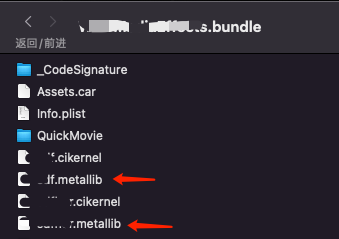
METALLIB

我这边主工程是用过cocoapod-binary插件管理二方库的加入,源码&静态Framework,一般Release模式提升编译速度,都是以framework方式,Debug模式有时候需要在主工程Debug二方库,可以选择是源码方式接入。

最终的逻辑如下:

1
2
3
4
5
6
7
8
9
10
11
12
13
14
15
16
17
post_install do |installer|
installer.pods_project.targets.each do |target|
...

target.build_configurations.each do |config|
...
#Release model, no need execute
if config.name != 'Release' && target.name == 'your target name'
puts "===================> #{config.name}"
eval(File.open('MetalBuildRule.rb').read) if File.exist? 'MetalBuildRule.rb'
# metal shader build rule
add_build_rule(target, installer.pods_project)
end

end
end
end

DONE

references

MetalCIKLReference
Add custom build rule with Podfile post_install hook
xcodeproj
xcode工程文件解析
CocoaPods源码与插件断点调试