BLACK_OX

The palest ink is better than the best memory


  • 首页

  • 标签

  • 分类

  • 归档

  • 关于

  • 搜索

vmstatu

发表于 2019-05-22 | 评论数: | 阅读次数:
本文字数: 7.4k | 阅读时长 ≈ 7 分钟

vmstatu

vmstat命令是最常见的Linux/Unix监控工具,可以展现给定时间间隔的服务器的状态值,包括服务器的CPU使用率,内存使用,虚拟内存交换情况,IO读写情况。
相比top,可以看到整个机器的CPU,内存,IO的使用情况,而不是单单看到各个进程的CPU使用率和内存使用率(使用场景不一样)。

1
2
3
4
$vmstat
procs -----------memory---------- ---swap-- -----io---- -system-- ------cpu-----
r b swpd free buff cache si so bi bo in cs us sy id wa st
1 0 0 215220 0 771404 0 0 2 15 0 1 0 0 100 0 0

一般vmstat工具的使用是通过两个数字参数来完成的,第一个参数是采样的时间间隔数,单位是秒,第二个参数是采样的次数

1
2
3
4
5
$vmstat 2 2
procs -----------memory---------- ---swap-- -----io---- -system-- ------cpu-----
r b swpd free buff cache si so bi bo in cs us sy id wa st
0 0 0 202924 0 785780 0 0 2 15 0 1 0 0 100 0 0
0 0 0 203032 0 785812 0 0 0 155 748 1382 0 0 100 0 0

第二个参数如果没有,就会一直采集(ctrl+c 结束)

1
2
3
4
5
6
7
8
$vmstat 2
procs -----------memory---------- ---swap-- -----io---- -system-- ------cpu-----
r b swpd free buff cache si so bi bo in cs us sy id wa st
1 0 0 194712 0 794728 0 0 2 15 0 1 0 0 100 0 0
0 0 0 194696 0 794768 0 0 0 50 782 1368 0 0 100 0 0
0 0 0 193828 0 794776 0 0 0 108 752 1156 0 0 100 0 0
0 0 0 193952 0 794804 0 0 0 4 601 997 0 0 100 0 0
^C

字段

procs

  • r 等待运行的进程数
  • b 处在非中断睡眠状态的进程数

memory (KB)

  • swpd 虚拟内存使用大小

注意:如果swpd的值不为0,但是SI,SO的值长期为0,这种情况不会影响系统性能。

  • free 空闲的内存
  • buff 用作缓冲的内存大小
  • cache 用作缓存的内存大小

注意:如果cache的值大的时候,说明cache处的文件数多,如果频繁访问到的文件都能被cache处,那么磁盘的读IO bi会非常小。

swap

  • si 从交换区写到内存的大小
  • so 每秒写入交换区的内存大小

内存够用的时候,这2个值都是0,如果这2个值长期大于0时,系统性能会受到影响,磁盘IO和CPU资源都会被消耗。有些朋友看到空闲内存(free)很少的或接近于0时,就认为内存不够用了,不能光看这一点,还要结合si和so,如果free很少,但是si和so也很少(大多时候是0),那么不用担心,系统性能这时不会受到影响的。

io

  • bi 每秒读取的块数
  • bo 每秒写入的块数

注意:随机磁盘读写的时候,这2个值越大(如超出1024k),能看到CPU在IO等待的值也会越大。

system

  • in 每秒中断数,包括时钟中断。
  • cs 每秒上下文切换数。

注意:上面2个值越大,会看到由内核消耗的CPU时间会越大。

cpu

  • us 用户进程执行时间(user time)

注意: us的值比较高时,说明用户进程消耗的CPU时间多,但是如果长期超50%的使用,那么我们就该考虑优化程序算法或者进行加速。

  • sy 系统进程执行时间(system time)

注意:sy的值高时,说明系统内核消耗的CPU资源多,这并不是良性表现,我们应该检查原因。

  • id 空闲时间(包括IO等待时间),中央处理器的空闲时间 。以百分比表示。

  • wa 等待IO时间百分比

注意:wa的值高时,说明IO等待比较严重,这可能由于磁盘大量作随机访问造成,也有可能磁盘出现瓶颈(块操作)。

1
2
3
4
5
6
7
8
9
10
11
12
13
14
15
16
17
18
19
20
21
22
23
24
25
26
Procs
r: The number of processes waiting for run time.
b: The number of processes in uninterruptible sleep.
Memory
swpd: the amount of virtual memory used.
free: the amount of idle memory.
buff: the amount of memory used as buffers.
cache: the amount of memory used as cache.
inact: the amount of inactive memory. (-a option)
active: the amount of active memory. (-a option)
Swap
si: Amount of memory swapped in from disk (/s).
so: Amount of memory swapped to disk (/s).
IO
bi: Blocks received from a block device (blocks/s).
bo: Blocks sent to a block device (blocks/s).
System
in: The number of interrupts per second, including the clock.
cs: The number of context switches per second.
CPU
These are percentages of total CPU time.
us: Time spent running non-kernel code. (user time, including nice time)
sy: Time spent running kernel code. (system time)
id: Time spent idle. Prior to Linux 2.5.41, this includes IO-wait time.
wa: Time spent waiting for IO. Prior to Linux 2.5.41, included in idle.
st: Time stolen from a virtual machine. Prior to Linux 2.6.11, unknown.

flutter plugin registry

发表于 2019-05-17 | 评论数: | 阅读次数:
本文字数: 20k | 阅读时长 ≈ 18 分钟

前言

首先这里有三个形似得英文单词registry, registrar and registrant分别对应注册局,注册商和注册人。
把它们翻译到现实的生活场景中的角色其实是一个“注册人通过注册商,更新注册信息后,注册商把信息传递给注册局进行保存”的过程。

注册人:GeneratedPluginRegistrant
注册局:[(FlutterViewController*)rootViewController pluginRegistry] == flutterEngine
注册商:FlutterEngineRegistrar

Flutter Application

flutter create -t plugin my_plugin

xcode 打开 my_plugin/example/ios路径下的 Runner工程

AppDelegate

1
2
3
4
5
6
7
8
9
10
@implementation AppDelegate

- (BOOL)application:(UIApplication *)application
didFinishLaunchingWithOptions:(NSDictionary *)launchOptions {
[GeneratedPluginRegistrant registerWithRegistry:self];
// Override point for customization after application launch.
return [super application:application didFinishLaunchingWithOptions:launchOptions];
}

@end

GeneratedPluginRegistrant

1
2
3
4
5
6
7
@implementation GeneratedPluginRegistrant

+ (void)registerWithRegistry:(NSObject<FlutterPluginRegistry>*)registry {
[MyPlugin registerWithRegistrar:[registry registrarForPlugin:@"MyPlugin"]];
}

@end

AppDelegate继承FlutterAppDelegate

FlutterAppDelegate

1
2
3
4
5
6
7
8
9
#pragma mark - FlutterPluginRegistry methods. All delegating to the rootViewController

- (NSObject<FlutterPluginRegistrar>*)registrarForPlugin:(NSString*)pluginKey {
UIViewController* rootViewController = _window.rootViewController;
if ([rootViewController isKindOfClass:[FlutterViewController class]]) {
return [[(FlutterViewController*)rootViewController pluginRegistry] registrarForPlugin:pluginKey];
}
return nil;
}

FlutterViewController

1
2
3
- (id<FlutterPluginRegistry>)pluginRegistry {
return _engine;
}

FlutterEngineRegistrar

1
2
3
4
5
6
7
8
9
10
11
12
13
14
15
16
17
18
19
20
21
22
23
@implementation FlutterEngineRegistrar {
NSString* _pluginKey;
FlutterEngine* _flutterEngine;
}

- (instancetype)initWithPlugin:(NSString*)pluginKey flutterEngine:(FlutterEngine*)flutterEngine {
self = [super init];
NSAssert(self, @"Super init cannot be nil");
_pluginKey = [pluginKey retain];
_flutterEngine = [flutterEngine retain];
return self;
}

- (void)addMethodCallDelegate:(NSObject<FlutterPlugin>*)delegate
channel:(FlutterMethodChannel*)channel {
[channel setMethodCallHandler:^(FlutterMethodCall* call, FlutterResult result) {
[delegate handleMethodCall:call result:result];
}];
}

- (NSObject<FlutterBinaryMessenger>*)messenger {
return _flutterEngine;
}

MyPlugin

1
2
3
4
5
6
7
8
9
10
11
12
13
14
15
16
17
18
@implementation MyPlugin
+ (void)registerWithRegistrar:(NSObject<FlutterPluginRegistrar>*)registrar {
FlutterMethodChannel* channel = [FlutterMethodChannel
methodChannelWithName:@"my_plugin"
binaryMessenger:[registrar messenger]];
MyPlugin* instance = [[MyPlugin alloc] init];
[registrar addMethodCallDelegate:instance channel:channel];
}

- (void)handleMethodCall:(FlutterMethodCall*)call result:(FlutterResult)result {
if ([@"getPlatformVersion" isEqualToString:call.method]) {
result([@"iOS " stringByAppendingString:[[UIDevice currentDevice] systemVersion]]);
} else {
result(FlutterMethodNotImplemented);
}
}

@end

FlutterMethodChannel

1
2
3
4
5
6
7
8
9
10
11
12
13
14
15
16
17
18
19
20
21
22
23
24
25
26
27
28
29
- (instancetype)initWithName:(NSString*)name
binaryMessenger:(NSObject<FlutterBinaryMessenger>*)messenger
codec:(NSObject<FlutterMethodCodec>*)codec {
self = [super init];
NSAssert(self, @"Super init cannot be nil");
_name = [name retain];
_messenger = [messenger retain]; //flutterEngine
_codec = [codec retain];
return self;
}

- (void)setMethodCallHandler:(FlutterMethodCallHandler)handler {
if (!handler) {
[_messenger setMessageHandlerOnChannel:_name binaryMessageHandler:nil];
return;
}
FlutterBinaryMessageHandler messageHandler = ^(NSData* message, FlutterBinaryReply callback) {
FlutterMethodCall* call = [_codec decodeMethodCall:message];
handler(call, ^(id result) {
if (result == FlutterMethodNotImplemented)
callback(nil);
else if ([result isKindOfClass:[FlutterError class]])
callback([_codec encodeErrorEnvelope:(FlutterError*)result]);
else
callback([_codec encodeSuccessEnvelope:result]);
});
};
[_messenger setMessageHandlerOnChannel:_name binaryMessageHandler:messageHandler];
}

FlutterEngine

1
2
3
4
5
6
7
8
9
10
11
12
13
14
15

#pragma mark - FlutterPluginRegistry

- (NSObject<FlutterPluginRegistrar>*)registrarForPlugin:(NSString*)pluginKey {
NSAssert(self.pluginPublications[pluginKey] == nil, @"Duplicate plugin key: %@", pluginKey);
self.pluginPublications[pluginKey] = [NSNull null];
return [[FlutterEngineRegistrar alloc] initWithPlugin:pluginKey flutterEngine:self];
}

- (void)setMessageHandlerOnChannel:(NSString*)channel
binaryMessageHandler:(FlutterBinaryMessageHandler)handler {
NSAssert(channel, @"The channel must not be null");
FML_DCHECK(_shell && _shell->IsSetup());
self.iosPlatformView->GetPlatformMessageRouter().SetMessageHandler(channel.UTF8String, handler);
}

FlutterBinaryMessage

1
2
3
4
5
6
7
8
9
10
11
12
13
14
15
16
17
18
/**
* A message reply callback.
*
* Used for submitting a binary reply back to a Flutter message sender. Also used
* in for handling a binary message reply received from Flutter.
*
* @param reply The reply.
*/
typedef void (^FlutterBinaryReply)(NSData* _Nullable reply);

/**
* A strategy for handling incoming binary messages from Flutter and to send
* asynchronous replies back to Flutter.
*
* @param message The message.
* @param reply A callback for submitting an asynchronous reply to the sender.
*/
typedef void (^FlutterBinaryMessageHandler)(NSData* _Nullable message, FlutterBinaryReply reply);

sublime text 3

发表于 2019-05-14 | 评论数: | 阅读次数:
本文字数: 2.4k | 阅读时长 ≈ 2 分钟

sublime text3 install package control

Tools -> Install package control

报错信息

工具栏View 点击show console 或者快捷键 ctrl+` 打开控制台看下如下报错信息

1
2
3
4
Visit https://packagecontrol.io/installation for manual instructions
Error installing Package Control: HTTPS error encountered, falling back to HTTP - <urlopen error [Errno 60] Operation timed out>
Error installing Package Control: HTTP error encountered, giving up - <urlopen error [Errno 60] Operation timed out>
error: An error occurred installing Package Control

处理办法

绑定域名

1
2
50.116.34.243 sublime.wbond.net
50.116.34.243 packagecontrol.io

install package

报错信息

There are no packages available for installation

处理办法

下载 channel_v3.json 文件 (google一下)

修改package control.sublime-settings

1
2
3
"channels": [
"/path/to/channel_v3.json"
]

vim shortcuts

发表于 2019-05-14 | 评论数: | 阅读次数:
本文字数: 70 | 阅读时长 ≈ 1 分钟

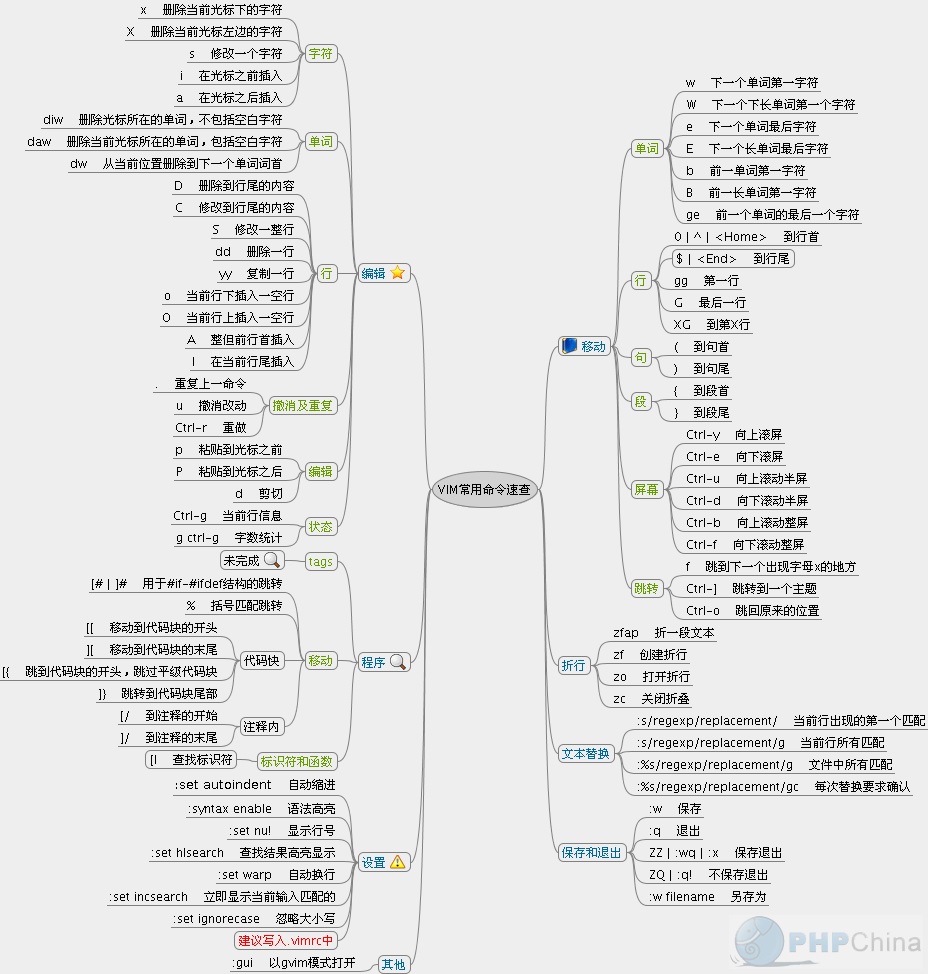
vim 快捷键

Flutter之Dart编译

发表于 2019-05-10 | 分类于 flutter | 评论数: | 阅读次数:
本文字数: 47k | 阅读时长 ≈ 43 分钟

前言

App中使用flutter已经有段时间了,最近遇到一个bug记录一下。更新flutter module工程pubspec plugin依赖,App工程中pod update之后,从功能表现上看依然是老代码。第一感觉是缓存导致的,xcode clean 以及删除DerivedData目录重新build依然不行,flutter module工程中执行flutter clean然后xcode build是正常的,所以应该是dart编译产物有缓存导致的。接下来看下dart编译过程。

阅读全文 »
1…34
BLACK_OX

BLACK_OX

Developer...
35 日志
10 分类
24 标签
RSS
GitHub E-Mail
© 2026 BLACK_OX | 512k | 7:46
由 Hexo 强力驱动
|
主题 – NexT.Gemini
|