BLACK_OX

The palest ink is better than the best memory


  • 首页

  • 标签

  • 分类

  • 归档

  • 关于

  • 搜索

coreimage with metal 笔记

发表于 2022-08-08 | 分类于 metal | 评论数: | 阅读次数:
本文字数: 28k | 阅读时长 ≈ 26 分钟

xcode

近期有自定义CoreImage的CIFilter的需求,前期通过CIKL 定义 CIKernel完成了任务,后面了解到CoreImage新特性支持metal的方式直接自定义 CIKernel,提高效率。

CIKL的方式,存在两个问题:

  • 编写 kernel 的时候,没有报错提示,哪怕是参数名错误都无法检查处理。效率极低。
  • 翻译转换,编译,都是发生到运行时,导致第一次使用滤镜的时候,耗时较久。

Metal: 在build阶段 就可以编译 链接 .metal文件
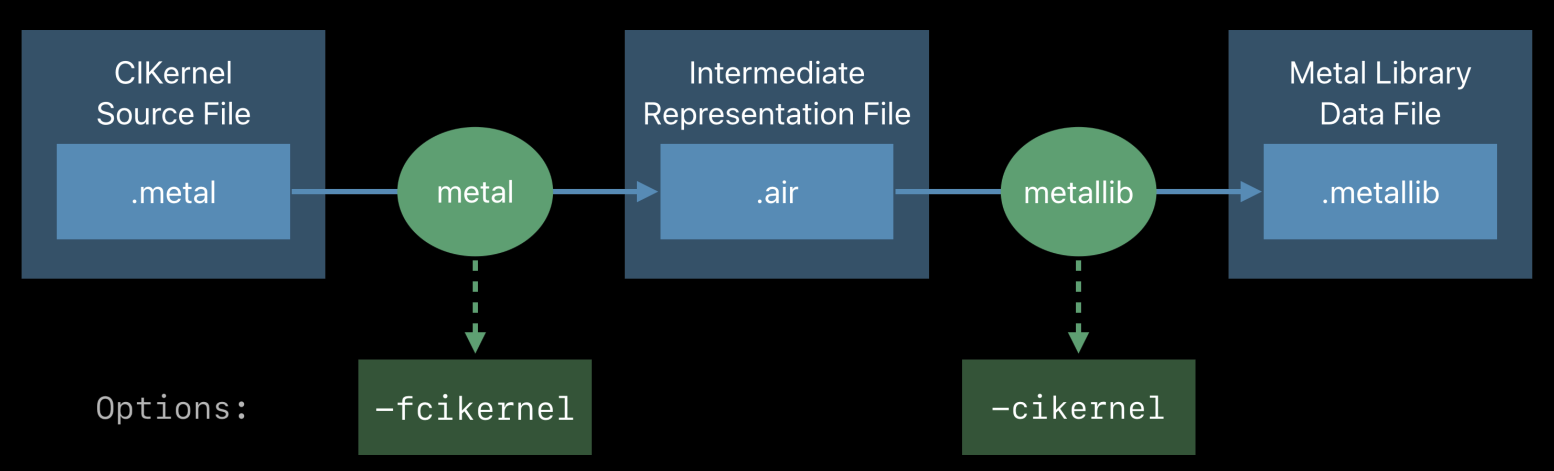
Compiling & Linking

参考苹果的官方文档 Metal Shading Language for CoreImage Kernels ,在xcode integration 部分提到在build setting 设置 Other Metal Compiler Flags, 文档已经很老了(2018年的),新版的xcode已经没有这个选项了,如果不做处理,会有报错 "/air-lld:1:1: symbol(s) not found for target 'air64-apple-ios12.0.0'" and "air-lld command failed with exit code 1 (use -v to see invocation)"


阅读全文 »

flutter 1.17共享engine

发表于 2020-06-03 | 分类于 flutter | 评论数: | 阅读次数:
本文字数: 30k | 阅读时长 ≈ 28 分钟

前言

flutter 升级到 1.17之后,app ios 线上遇到一个crash ,通过官方的 符号表文件 flutter.dsym 还原出堆栈如下

1
2
3
4
5
6
0 auto fml::internal::CopyableLambda<flutter::Shell::OnPlatformViewCreated(std::__1::unique_ptr<flutter::Surface, std::__1::default_delete<flutter::Surface> >)::$_8>::operator()<>() const (in Flutter) (make_copyable.h:24)
1 auto fml::internal::CopyableLambda<flutter::Shell::OnPlatformViewCreated(std::__1::unique_ptr<flutter::Surface, std::__1::default_delete<flutter::Surface> >)::$_8>::operator()<>() const (in Flutter) (make_copyable.h:24)
2 fml::MessageLoopImpl::FlushTasks(fml::FlushType) (in Flutter) (message_loop_impl.cc:129)
3 fml::MessageLoopDarwin::OnTimerFire(__CFRunLoopTimer*, fml::MessageLoopDarwin*) (in Flutter) (message_loop_darwin.mm:76)
9 fml::MessageLoopDarwin::Run() (in Flutter) (message_loop_darwin.mm:47)
10 void* std::__1::__thread_proxy<std::__1::tuple<std::__1::unique_ptr<std::__1::__thread_struct, std::__1::default_delete<std::__1::__thread_struct> >, fml::Thread::Thread(std::__1::basic_string<char, std::__1::char_traits<char>, std::__1::allocator<char> > const&)::$_0> >(void*) (in Flutter) (thread:352)

这里还只能看到crash在engine的c++代码中,具体原因未知

阅读全文 »

flutter 1.17升级

发表于 2020-05-21 | 分类于 flutter | 评论数: | 阅读次数:
本文字数: 16k | 阅读时长 ≈ 15 分钟

升级

最近官方发布了flutter 稳定版本1.17.0 ,记录下升级1.17 ios上碰到的的问题

App产物

在 1.12.13 的时候,为了支持模拟器运行,会进行 debug 产物 跟 release 产物的merge (lipo create …)
debug 产物 x86 、release 产物 arm64 arm7

升级到1.17.0 之后 ,merge报错

IMAGE

lipo 查看下

IMAGE

发现针对模拟器的debug产物 含有arm64

Debug Flutter tool源码, build 里面进行了两次createStubAppFramework(iphone && simulator)
然后做了merge,实际上environment参数里面 iosArchs只有 arch x86,所以问题出在这里

DebugUniveralFramework

1
2
3
4
5
6
7
8
9
10
11
12
13
14
15
16
17
18
19
20
21
22
23
24
25
26
27
28
29
30
31
32
33
34
35
36
37
38
39
40
41
@override
Future<void> build(Environment environment) async {
// Generate a trivial App.framework.
final Set<DarwinArch> iosArchs = environment.defines[kIosArchs]
?.split(' ')
?.map(getIOSArchForName)
?.toSet()
?? <DarwinArch>{DarwinArch.arm64};
final File iphoneFile = environment.buildDir.childFile('iphone_framework');
final File simulatorFile = environment.buildDir.childFile('simulator_framework');
final File lipoOutputFile = environment.buildDir.childFile('App');
final RunResult iphoneResult = await createStubAppFramework(
iphoneFile,
SdkType.iPhone,
// Only include 32bit if it is contained in the active architectures.
include32Bit: iosArchs.contains(DarwinArch.armv7)
);
final RunResult simulatorResult = await createStubAppFramework(
simulatorFile,
SdkType.iPhoneSimulator,
);
if (iphoneResult.exitCode != 0 || simulatorResult.exitCode != 0) {
throw Exception('Failed to create App.framework.');
}
final List<String> lipoCommand = <String>[
'xcrun',
'lipo',
'-create',
iphoneFile.path,
simulatorFile.path,
'-output',
lipoOutputFile.path
];
final RunResult lipoResult = await processUtils.run(
lipoCommand,
);

if (lipoResult.exitCode != 0) {
throw Exception('Failed to create App.framework.');
}
}

解决办法 可以通过archs 判断下具体执行

1
2
3
4
5
6
7
8
9
10
11
12
13
14
15
16
17
18
19
20
21
22
23
24
25
26
27
28
29
30
31
32
33
34
35
36
37
38
39
40
41
42
43
44
45
46
47
48
49
50
51
52
53
54
55
56
57
58
59
60
61
62
63
64
65
@override
Future<void> build(Environment environment) async {
// Generate a trivial App.framework.
final Set<DarwinArch> iosArchs = environment.defines[kIosArchs]
?.split(' ')
?.map(getIOSArchForName)
?.toSet()
?? <DarwinArch>{DarwinArch.arm64};
final File iphoneFile = environment.buildDir.childFile('iphone_framework');
final File simulatorFile = environment.buildDir.childFile('simulator_framework');
final File lipoOutputFile = environment.buildDir.childFile('App');

RunResult iphoneResult;

if(iosArchs.contains(DarwinArch.arm64) || iosArchs.contains(DarwinArch.armv7)) {
iphoneResult = await createStubAppFramework(
iphoneFile,
SdkType.iPhone,
// Only include 32bit if it is contained in the active architectures.
include32Bit: iosArchs.contains(DarwinArch.armv7)
);
if (iphoneResult.exitCode != 0) {
throw Exception('(iphoneResult)Failed to create App.framework.');
}
}

RunResult simulatorResult;

if(iosArchs.contains(DarwinArch.x86_64)) {
simulatorResult = await createStubAppFramework(
simulatorFile,
SdkType.iPhoneSimulator,
);
if (simulatorResult.exitCode != 0) {
throw Exception('(simulatorResult)Failed to create App.framework.');
}
}

if(simulatorResult == null) {
iphoneFile.copySync(lipoOutputFile.path);
return;
}

if(iphoneResult == null) {
simulatorFile.copySync(lipoOutputFile.path);
return;
}

final List<String> lipoCommand = <String>[
'xcrun',
'lipo',
'-create',
iphoneFile.path,
simulatorFile.path,
'-output',
lipoOutputFile.path
];
final RunResult lipoResult = await processUtils.run(
lipoCommand,
);

if (lipoResult.exitCode != 0) {
throw Exception('Failed to create App.framework.');
}
}

突然想到 既然1.17 对debug 产物做了arm64的支持,那我们收集产物是不是可以不用自己做merge,发现是不可以的
因为除了App.framework,还有plugin native代码生成的pod静态库 libxxx.a。
静态库 是哪里生成的呢?

这里 build_ios.dart -> buildXcodeProject

1
2
3
4
5
6
7
8
9
10
11
12
13
14
15
16
17
18
...

final List<String> buildCommands = <String>[
'/usr/bin/env',
'xcrun',
'xcodebuild',
'-configuration', configuration,
];

...

if (buildForDevice) {
buildCommands.addAll(<String>['-sdk', 'iphoneos']);
} else {
buildCommands.addAll(<String>['-sdk', 'iphonesimulator', '-arch', 'x86_64']);
}

...

这里只针对x86做了xcode build,所以还是要自己merge的…

flutter tool debug

发表于 2020-03-13 | 分类于 flutter | 评论数: | 阅读次数:
本文字数: 2.6k | 阅读时长 ≈ 2 分钟

Flutter

flutter 开发过程中,少不了会运行一些 flutter 命令 ,比如 flutter build xxx 、 flutter run 等等
看下 bin/flutter 脚本,背后都是 flutter_tool 在执行各种操作。

1
2
3
4
5
6
7
8

FLUTTER_TOOLS_DIR="$FLUTTER_ROOT/packages/flutter_tools"
SNAPSHOT_PATH="$FLUTTER_ROOT/bin/cache/flutter_tools.snapshot"
STAMP_PATH="$FLUTTER_ROOT/bin/cache/flutter_tools.stamp"
SCRIPT_PATH="$FLUTTER_TOOLS_DIR/bin/flutter_tools.dart"
DART_SDK_PATH="$FLUTTER_ROOT/bin/cache/dart-sdk"

"$DART" --packages="$FLUTTER_TOOLS_DIR/.packages" $FLUTTER_TOOL_ARGS "$SNAPSHOT_PATH" "$@"
阅读全文 »

flutter共享engine

发表于 2020-03-10 | 分类于 flutter | 评论数: | 阅读次数:
本文字数: 6.2k | 阅读时长 ≈ 6 分钟

flutter 共享引擎 问题记录

共享引擎,就是只有一个 flutter engine,每个页面一个 flutterviewcontroller。
flutter页面 切换,引擎会相应的 detach atach

最近 升级 flutter 到 v1.12.13 版本后,贡献引擎遇到的几个问题 记录下

阅读全文 »

flutter engine 定制

发表于 2020-03-05 | 分类于 flutter | 评论数: | 阅读次数:
本文字数: 776 | 阅读时长 ≈ 1 分钟

…

使用Flutter开发的时候最直接接触的并不是 Flutter Engine 而是 Flutter Framework(https://github.com/flutter/flutter)
在flutter framework 的 目录里面 有编译好的engine 产物

简单说就是, 编译引擎 替换 产物文件就好了

路径 flutter_path/bin/cache/artifacts/engine/ios

参考

Flutter Engine定制流程
Flutter Engine 编译指北

flutter eventChannel crash on ios

发表于 2019-10-21 | 分类于 flutter | 评论数: | 阅读次数:
本文字数: 13k | 阅读时长 ≈ 11 分钟

flutter issue

crash

记录一次困扰了很久的 flutter event channel crash

EventChannel dart

1
2
3
4
5
6
7
8
9
10
11
12
13
14
15
16
17
18
19
20
21
22
23
24
25
26
27
28
29
30
31
32
33
34
35
36
37
38
39
40
41
Stream<dynamic> receiveBroadcastStream([ dynamic arguments ]) {
final MethodChannel methodChannel = MethodChannel(name, codec);
StreamController<dynamic> controller;
controller = StreamController<dynamic>.broadcast(onListen: () async {
defaultBinaryMessenger.setMessageHandler(name, (ByteData reply) async {
if (reply == null) {
controller.close();
} else {
try {
controller.add(codec.decodeEnvelope(reply));
} on PlatformException catch (e) {
controller.addError(e);
}
}
return null;
});
try {
await methodChannel.invokeMethod<void>('listen', arguments);
} catch (exception, stack) {
FlutterError.reportError(FlutterErrorDetails(
exception: exception,
stack: stack,
library: 'services library',
context: ErrorDescription('while activating platform stream on channel $name'),
));
}
}, onCancel: () async {
defaultBinaryMessenger.setMessageHandler(name, null);
try {
await methodChannel.invokeMethod<void>('cancel', arguments);
} catch (exception, stack) {
FlutterError.reportError(FlutterErrorDetails(
exception: exception,
stack: stack,
library: 'services library',
context: ErrorDescription('while de-activating platform stream on channel $name'),
));
}
});
return controller.stream;
}

FlutterChannel.mm

1
2
3
4
5
6
7
8
9
10
11
12
13
14
15
16
17
18
19
20
21
22
23
24
25
26
27
28
29
30
31
32
33
34
35
36
37
38
39
40
41
42
43
44
45
46
47
static void SetStreamHandlerMessageHandlerOnChannel(NSObject<FlutterStreamHandler>* handler,
NSString* name,
NSObject<FlutterBinaryMessenger>* messenger,
NSObject<FlutterMethodCodec>* codec) {
__block FlutterEventSink currentSink = nil;
FlutterBinaryMessageHandler messageHandler = ^(NSData* message, FlutterBinaryReply callback) {
FlutterMethodCall* call = [codec decodeMethodCall:message];
if ([call.method isEqual:@"listen"]) {
if (currentSink) {
FlutterError* error = [handler onCancelWithArguments:nil];
if (error)
NSLog(@"Failed to cancel existing stream: %@. %@ (%@)", error.code, error.message,
error.details);
}
currentSink = ^(id event) {
if (event == FlutterEndOfEventStream)
[messenger sendOnChannel:name message:nil];
else if ([event isKindOfClass:[FlutterError class]])
[messenger sendOnChannel:name message:[codec encodeErrorEnvelope:(FlutterError*)event]];
else
[messenger sendOnChannel:name message:[codec encodeSuccessEnvelope:event]];
};
FlutterError* error = [handler onListenWithArguments:call.arguments eventSink:currentSink];
if (error)
callback([codec encodeErrorEnvelope:error]);
else
callback([codec encodeSuccessEnvelope:nil]);
} else if ([call.method isEqual:@"cancel"]) {
if (!currentSink) {
callback(
[codec encodeErrorEnvelope:[FlutterError errorWithCode:@"error"
message:@"No active stream to cancel"
details:nil]]);
return;
}
currentSink = nil;
FlutterError* error = [handler onCancelWithArguments:call.arguments];
if (error)
callback([codec encodeErrorEnvelope:error]);
else
callback([codec encodeSuccessEnvelope:nil]);
} else {
callback(nil);
}
};
[messenger setMessageHandlerOnChannel:name binaryMessageHandler:messageHandler];
}

EventSink

正常结束stream流 eventSink(FlutterEndOfEventStream) ,异常结束stream流 eventSink(FlutterError) 都会回调执行 onCancel

参考

Flutter 与 Native(iOS) 通信原理
深入Flutter技术内幕:Platform Channel设计与实现

flutter ios 13 dark mode

发表于 2019-10-14 | 分类于 flutter | 评论数: | 阅读次数:
本文字数: 9.1k | 阅读时长 ≈ 8 分钟

前言

ios 13 开启 dark model,flutter页面status bar文字一直是白色

flutter issues

1
SystemChrome.setSystemUIOverlayStyle(SystemUiOverlayStyle.dark);

设置dark style 并没有用

SystemChrome

1
2
3
4
5
6
7
8
9
10
11
12
13
14
15
16
17
18
19
20
21
22
23
24
25
static void setSystemUIOverlayStyle(SystemUiOverlayStyle style) {
assert(style != null);
if (_pendingStyle != null) {
// The microtask has already been queued; just update the pending value.
_pendingStyle = style;
return;
}
if (style == _latestStyle) {
// Trivial success: no microtask has been queued and the given style is
// already in effect, so no need to queue a microtask.
return;
}
_pendingStyle = style;
scheduleMicrotask(() {
assert(_pendingStyle != null);
if (_pendingStyle != _latestStyle) {
SystemChannels.platform.invokeMethod<void>(
'SystemChrome.setSystemUIOverlayStyle',
_pendingStyle._toMap(),
);
_latestStyle = _pendingStyle;
}
_pendingStyle = null;
});
}

FlutterPlatformPlugin

1
2
3
4
5
6
7
8
9
10
11
12
13
14
15
16
17
18
19
20
21
22
23
24
25
26
27
28
29
- (void)setSystemChromeSystemUIOverlayStyle:(NSDictionary*)message {
NSString* style = message[@"statusBarBrightness"];
if (style == (id)[NSNull null])
return;

UIStatusBarStyle statusBarStyle;
if ([style isEqualToString:@"Brightness.dark"])
statusBarStyle = UIStatusBarStyleLightContent;
else if ([style isEqualToString:@"Brightness.light"])
statusBarStyle = UIStatusBarStyleDefault;
else
return;

NSNumber* infoValue = [[NSBundle mainBundle]
objectForInfoDictionaryKey:@"UIViewControllerBasedStatusBarAppearance"];
Boolean delegateToViewController = (infoValue == nil || [infoValue boolValue]);

if (delegateToViewController) {
// This notification is respected by the iOS embedder
[[NSNotificationCenter defaultCenter]
postNotificationName:@(kOverlayStyleUpdateNotificationName)
object:nil
userInfo:@{@(kOverlayStyleUpdateNotificationKey) : @(statusBarStyle)}];
} else {
// Note: -[UIApplication setStatusBarStyle] is deprecated in iOS9
// in favor of delegating to the view controller
[[UIApplication sharedApplication] setStatusBarStyle:statusBarStyle];
}
}

engine 源码中 可以看到 没有 UIStatusBarStyleDarkContent

尝试 去掉 info.plist 中的 UIViewControllerBasedStatusBarAppearance

然后 监听 通知

1
2
3
4
5
6
7
[[NSNotificationCenter defaultCenter] addObserver:self selector:@selector(appStatusBar:) name:@"io.flutter.plugin.platform.SystemChromeOverlayNotificationName" object:nil];

- (void)appStatusBar:(id)notification {
if (@available(iOS 13.0, *)) {
[UIApplication sharedApplication].statusBarStyle = UIStatusBarStyleDarkContent;
}
}

mustache之dart

发表于 2019-05-31 | 分类于 flutter | 评论数: | 阅读次数:
本文字数: 17k | 阅读时长 ≈ 16 分钟

前言

Mustache 是一个 logic-less (轻逻辑)模板解析引擎,可以应用在 js、PHP、Python、Perl 等多种编程语言中。这里主要是看dart中的应用。

模板语法很简单 看这里

1
2
3
4
5
6
7
{{keyName}} 
{{#keyName}} {{/keyName}}
{{^keyName}} {{/keyName}}
{{.}}
{{>partials}}
{{{keyName}}}
{{!comments}}

阅读全文 »

jvm调优

发表于 2019-05-23 | 分类于 java | 评论数: | 阅读次数:
本文字数: 1.4k | 阅读时长 ≈ 1 分钟

jps

输出JVM中运行的进程状态信息

1
2
3
4
-q 不输出类名、Jar名和传入main方法的参数
-m 输出传入main方法的参数
-l 输出main类或Jar的全限名
-v 输出传入JVM的参数

jps -mlv
找到java应用的pid

jstack

根据java应用pid ,查看进程中线程堆栈信息

jstack pid

top

找出该进程内最耗费CPU的线程

top -Hp pid

转为十六进制
printf "%x\n" 线程id

输出进程的堆栈信息,然后根据线程ID的十六进制值grep
jstack pid | grep 十六进制线程id

jmap

查看堆内存使用状况
jmap -heap pid

进程内存使用情况dump到文件中 结合MAT工具分析
jmap -dump:format=b,file=dumpFileName pid

jhat

jhat -port 9998 /tmp/dump.dat
localhost:9998 查看内存对象情况 (不如MAT直观)

1234
BLACK_OX

BLACK_OX

Developer...
35 日志
10 分类
24 标签
RSS
GitHub E-Mail
© 2026 BLACK_OX | 512k | 7:46
由 Hexo 强力驱动
|
主题 – NexT.Gemini
|